





In today’s competitive social media landscape, Instagram has emerged as one of the most popular platforms. The platform is quite crowded, with billions of users vying for a noteworthy presence. Have you ever thought about how your audience will know that you’re a reliable resource or that the Instagram account you own is actually YOU? That little blue checkmark placed after your profile name, commonly known as Instagram verification, can serve as an ultimate symbol of digital trust, authority, and account security. Want to know how to get verified on Instagram? Good News: the process is quite simpler than you think!
Do you know that on average, verified accounts on Instagram are more likely to have a 30% higher engagement than regular accounts? No matter whether you are a social media creator, run a small business online, a prominent public figure, or a fast-growing startup brand, that one Instagram blue tick can completely transform how your audience sees you as an individual or a business.
With two types of verification processes – the paid one and the traditional one, it can still be confusing. In this comprehensive guide, we will explore why Instagram verification is crucial to your profile, how you can get started by submitting the verification application, common mistakes you should avoid, and more. Let’s secure this blue badge soon!
What Is Instagram Verification?
It refers to a blue checkmark or a blue badge placed next to your profile name that confirms your account’s authenticity and your notable public presence as a prominent social personality, celebrity, or brand.
When your Instagram profile is verified, it helps you to increase your brand credibility, enhance your social media visibility, and prevent account impersonation. It can even help users to find genuine accounts on the platform by identifying the blue badge.
There are two ways you can get your Instagram account verified: either by organic verification for notable accounts or by opting for paid Meta Verified Subscriptions.
- Key Aspects of Instagram Verification
Let’s know certain key aspects of Instagram account verification:
- What the verification includes: The badge confirms the authenticity of your Instagram account, and it proves that the account belongs to a real entity that it claims to represent.
- What it doesn’t include: The badge doesn’t serve as a symbol of importance or expert endorsement by Instagram itself.
Key Differences between Verified and Unverified Instagram Accounts
Unless you have a clear idea about the major differences between a verified and an unverified account on Instagram can make to your profile, you may think that getting the verification badge can be a negotiable strategy, while it is not.
Getting your Instagram profile verification done is crucial to many aspects of your presence and credibility on that platform. Before we know how to get verified on Instagram, let’s explore the key differences between verified and unverified Instagram accounts:
| Factors To Note | Verified Instagram Account | Unverified Instagram Account |
| 1. Authenticity Badge | These accounts feature a blue tickmark or checkmark that confirms Instagram has verified the profile as the authentic presence of the user or the business. | Unverified accounts don’t own this blue badge, so it doesn’t reflect any real presence of the user or the brand. |
| 2. Support and Features | The users of Meta-verified Instagram accounts get access to enhanced support from the platform as well as verification benefits. | Users of unverified accounts don’t get access to these facilities and security benefits. |
| 3. Account Limitations | These accounts, especially the ones verified under older guidelines, are often unable to change their username once they are approved. | You can seamlessly change your profile user name even after it gets approved. |
| 4. Trust and Credibility | These accounts are more likely to be perceived as more legitimate and drive more audience engagement. | Unverified accounts can be perceived as fake or impersonation profiles, even by your potential and existing Instagram audience. |
| 5. Impersonation Protection | These verified profiles are less likely to get impersonated and enjoy many other account security benefits. Instagram users identify the real profiles among the fake ones by detecting the blue checkmark. | Unverified Instagram accounts are often susceptible to profile impersonation, and the platform users may perceive these accounts as fake. |
| 6. Visibility and Reach | These profiles often appear more prominently in search results, comments, and explore sections when someone searches for the username using the platform’s search bar. | People may struggle to detect the real profiles on Instagram if they are not verified. |
2 Major Types of Instagram Verification in 2026
Before you learn how to get verified on Instagram, let’s look at the two major types of verification you need to prioritize:
The verification process consists of two different pathways, including the traditional and Meta-verified ones. While public figures can prioritize the free traditional way of verifying their accounts, you can get a paid monthly subscription from Instagram to choose the verified identity and security. Though both methods offer you a blue badge, the processes differ significantly in their cost, benefits, and eligibility.
- Traditional Verification (Notability-Based)
This is the older and legacy verification process for high-profile public figures, brands, and celebrities. It is completely a free method as you don’t need to pay for getting your Instagram account verified with the blue tick.
If your account represents a known and often-searched profile, entity, or brand, you can opt for this profile verification process. Your account must be authentic, unique, notable, and complete to apply for this traditional verification process. However, it requires you to provide the documentation of press coverage. Instagram is more likely to take up to 30 days to manually review your profile before verifying it with the blue badge.
- Paid Verification (Meta Verified)
This is a monthly subscription-based paid method to get your Instagram account verified. This subscription-based Instagram verification service is specifically designed for social media creators and brands to prove their authenticity quickly.
The verification can cost approximately $11.99–$14.99/month, but the package may increase for businesses. You need to pay the price through the App Store or Google Play. Anyone with more than 18 years of age can apply for Meta Verified Instagram verification based on the basic criteria provided. One needs to have an active subscription, a profile photo that perfectly matches the ID, and government ID verification.
Why Must You Prioritize Verifying Your Instagram Account?
Apart from an enhanced social media presence, Instagram account verification comes with a list of benefits. If you are one of those who think that verifying your Instagram account is an optional process, let us clear your confusion that it’s not.
From elevating your brand credibility and customer trust to protecting your account from getting impersonated, verification offers you many advantages. Check out the benefits and understand why you can’t avoid prioritizing your account verification:
- Enhanced Brand Credibility and Trust
The blue badge or checkmark serves as a symbol of honor that instantly tells users about the legitimacy of your Instagram account. It tells that your Instagram account is not a fan page or fake profile, the owner of the account is a real entity and brand.
Apart from these, verification establishes a professional authority of your account in your niche, encouraging your followers and potential partners to trust the content you share, the products and services you offer.
- Better Brand Opportunities
When you are a creator or own a small brand on Instagram, a verified account helps you to attract other high-profile brands, collaborators, and other influencers. Many high-profile brands prefer partnering with verified Instagram users to promote their products and services. Getting your account verified can help you to make your profile noticeable to those brands.
Verified accounts represent lower risk and higher credibility; if small creators have this badge, they can ensure faster audience growth and position their profile as authoritative in its niche.
- Higher Social Media Visibility and Reach
Verified Instagram accounts receive privileged treatment, such as prominent appearance in the online search results, explore sections, recommendations, and even in feed algorithms. This priority placement helps the accounts get noticed by their target audience.
Additionally, the enhanced visibility makes the Instagram accounts easy for new users to find you. It even improves your account’s organic reach and ensures better engagement for the content you share on Instagram.
- Protection from Instagram Account Impersonation
When your Instagram account is verified, it is less likely to get impersonated. Meta Verification offers proactive monitoring to prevent fake and impersonated profiles representing your presence on the platform. You can safeguard your online reputation by preventing your Instagram profile from being misused.
Impersonators often struggle a lot in copying verified Instagram profiles. This keeps your audience safe from any kind of phishing attempts and misinformation spreading. If you are struggling with an impersonation of your Instagram account, you must seek professional guidance from an Instagram account removal service provider.
- Access to Better Account Support
Verified Instagram accounts receive better support from the platform. As compared to the unverified Instagram accounts, the verified ones get access to human and prioritized support to handle significant concerns like ad-related issues, account hacks, and restrictions.
When you have a verified account, it eliminates the frustration of dealing with automated bots. Additionally, it minimizes downtime and protects your business operations from fraudulent activities on social media.
Key Requirements for Instagram Account Verification
You need to meet certain requirements to get verified on Instagram. Here, we have outlined the criteria that individuals and businesses must meet before applying for verification:
- Traditional (Free) Verification Requirements
To apply through the traditional verification method, you need to qualify for these requirements criterias to get the blue badge –
- Real Entity: Your Account must represent a real person, a registered brand, and entity.
- Profile Uniqueness: The account should be owned by only one person or business; it can be verified. However, there are exceptions for the language-specific accounts on Instagram.
Note: General interest accounts on Instagram, such as meme pages, are less likely to be verified by the platform.
- Complete Profile: The Instagram account must be public, with a complete bio, a profile photo, and at least one post on the platform. However, it cannot contain the ‘add me’ links to other social media services.
- Notable Presence: The account you want to verify must represent a person who is highly searched, an authoritative brand, or a well-known entity.
- Meta Verified (Paid Subscription) Requirements
If you don’t have great media coverage till day, you may struggle getting your account verified on Instagram through the traditional method. However, don’t worry! You can pay for the verification by opting for the paid subscriptions of Meta. The following are some requirements to apply for the Meta-verified paid subscription service:
- Age: The account holder’s age must be at least 18 years old.
- Account Activity: The account must be active and have a consistent history of posting.
- Profile Requirements: The profile should be complete with a bio and a profile picture that perfectly matches the account holder’s face in your government-issued ID.
- Two-Factor Authentication: This authentication must be enabled on that Instagram profile.
- ID Verification: The account holder must have a government-issued photo ID that matches the profile name and photo.
- Availability: The account holder must be from a supported country.
4 Easy Steps to Get Verified on Instagram: A Complete Guide for Individuals and Businesses
Getting verified on Instagram helps individuals and businesses build immediate audience trust and brand credibility. Many often perceive the traditional and free blue badge as just a blue tick placed after their profile name – while in reality, this badge offers you a notable presence on the platform and allows you to position yourself as an authoritative resource in your niche.
You can either apply the badge using the Instagram Help Center or apply via the Meta Store to get the direct subscription. These two processes are not the complicated ones – you can follow a strategic approach to get the Instagram blue tick by establishing a robust profile and platform presence for the verification.
Wondering how to get verified on Instagram? Here we have provided you with a complete step-by-step guide on this. Let’s have a look:
Step 1: Optimize Your Profile First
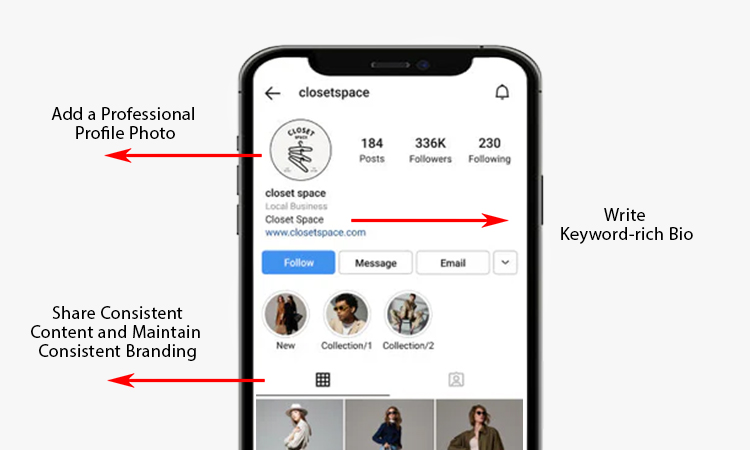
Firstly, you need to optimize your Instagram profile with a profile photo, a compelling bio, call to actions, and engaging content. Having an active account on Instagram is not enough to get a verification badge. If your Instagram presence is not noteworthy, the Instagram team may not grant your apparel to get your profile verified.
Effective social media reputation management strategies require you to follow certain major steps to build and optimize your Instagram profile:
- Add a Professional Profile Photo
You must use a high-quality and recognizable photo for your Instagram profile picture – a headshot is preferable for personal brands or individuals. On the other hand, a clear and centered logo can be ideal for business accounts. However, all the profile pictures must be aligned with the individual’s or the business’s current online presence.
A bio plays a huge role in reflecting your or your brand’s personality on the platform. The bio must be compelling – you need to clearly state who you serve and what you do. Don’t forget to add a clear Call to Action (CTA) in the bio if you own a brand and want your audience to take a desired action, like ordering from your small business or visiting your website.
- Write Keyword-rich Bio
To optimize your bio, you can naturally add niche keywords in the bio content to help the Instagram search engine easily categorize your profile or your brand.
- Share Consistent Content and Maintain Consistent Branding
To optimize your Instagram profile and showcase that it’s active, you need to regularly post high-quality content to keep the audience thoroughly engaged. However, it’s not just about posting anything to get attention. You need to ensure that your visual style (colors, tone, and fonts) perfectly matches your website presence and branding.
Step 2: Build a Strong Online Presence
This step is quite difficult to follow, but not with the right strategies. To build a strong presence on the platform, you need to make yourself or your brand appear in top news articles, as well as partner with social media influencers popular on Instagram. Here’s how you can do it:
- Appear in News Articles and Publications
To achieve a notable presence on Instagram, you must appear in news articles and publications. Social media platforms like Instagram look for public interest – getting featured in industry blogs, press releases, and reputable news outlets can help you to showcase your brand presence in an authoritative position.
Note for You: Instagram reviewers will not count paid or sponsored advertorials as genuine media coverage. You need to earn the media coverage opportunities authentically and naturally by building strong relationships with journalists and media professionals.
- Collaborate with Popular Instagram Influencers and Brands
Another way is to partner with social media influencers popular on Instagram, especially those with a large number of followers. When you collaborate with popular Instagram influencers, it helps you get the attention of their followers as well. We suggest that you partner with already-verified and high-profile accounts to strengthen your Instagram presence.
You must co-host Instagram Collab posts and try to get mentioned by the established entities. It will help you to increase your brand’s overall digital footprint on the platform. Additionally, it signals high search volume to Instagram as well.
Step 3: Apply for Verification (The Traditional Method)
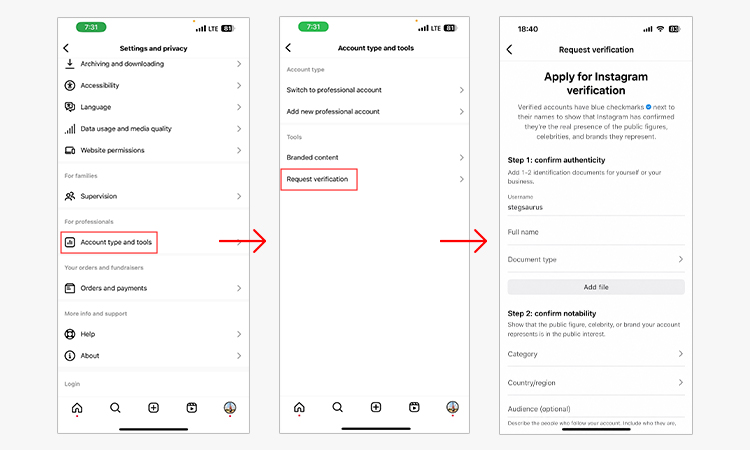
Individuals and brands can now apply for Instagram verification. It can be done directly through the app itself – through the Instagram Help Center, or by upgrading through your Meta Verified subscription.
Wondering how to get verified on Instagram through the traditional method? Here in this section, we will talk about the traditional way to get the verification and the blue badge.
The traditional method is specifically designed to serve the notable public figures, celebrities, and global brands. The following is a process through which you can submit the verification application:
- Firstly, you need to open your Instagram app and tap on the Profile icon present in the bottom right corner.
- Secondly, you need to tap the Menu icon, which you can find in the top right corner.
- Thirdly, you need to navigate to Settings and Privacy, and scroll down to the For Professionals section and tap on the Creator Tools and controls. You will also find Business Tools and controls.
- Fourthly, a form will appear on the screen. Fill out the required details in the form, such as your full and legal name.
- Then submit your Instagram ID along with accurate business documents. For this, you need to select your official Document type, such as your passport, driver’s license, or government-issued photo ID.
- Now you need to choose the industry that perfectly fits your public presence or business, among Sports, Creator, Fashion, and News/Media.
- You need to briefly explain your audience type and your profile’s USPs to submit your Instagram verification application.
- We suggest that you add URLs of your website, press mentions, and news features to support your verification application. However, you shouldn’t add URLs of paid or sponsored media content.
- You need to select the Request Verification to submit your application for the blue badge.
Step 4: Apply for Meta Verification (Paid Option)
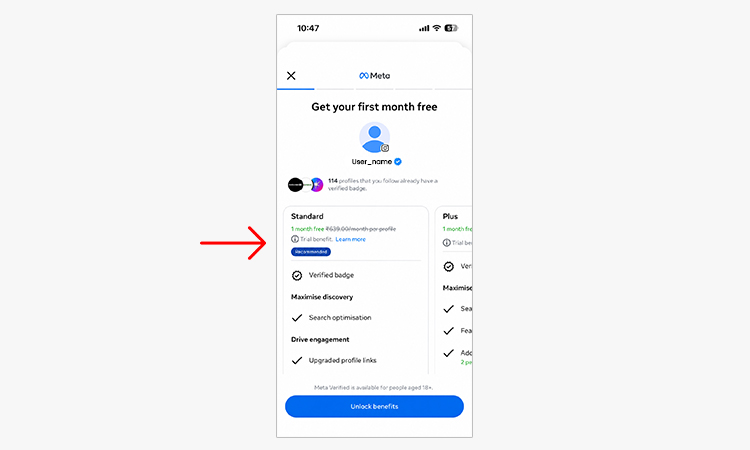
Now we will talk about the comprehensive process to get your Instagram profile verified through a paid Meta subscription. Follow the steps below to get the paid Meta verified subscription:
- Navigate to the Subscription Section
To verify the general interest accounts on Instagram, you need to open the Instagram app on your mobile. Then go to your Profile and tap the Menu icon, shown as the three lines in the top right corner of the screen. After that, you need to navigate to the Subscription Section by tapping into the Settings and Privacy, followed by the Settings section.
Find the Meta Account Center and tap See More in the Account Center. Now you can scroll down and tap the Meta verified – if you cannot see the option, you may need to join the waitlist for your region to get the verified badge.
- Submit Your ID Verification Appeal
You need to select the specific Instagram profile that you want to verify. Then you will be redirected to some instructions that you need to follow to confirm your identity. The verification process requires you to upload a photo of a government-issued photo ID, passport, or national ID card.
It depends on your location, as Meta may also require you to shoot and submit a short selfie video to ensure your face matches the photo ID. Then you need to submit the information for review, which generally takes between 48 and 72 hours.
- Regularly Pay the Monthly Fee
Once your ID is approved by Meta, you will be prompted to go through the payment process. Through the billing process, you need to complete the payment for the subscription. The payment is generally processed through the app store (either App Store or Google Play Store). You can pay the fees using the linked UPI, credit card, or debit card, depending on your country.
You must maintain a valid payment method to maintain a valid payment method. It will help you prevent your Meta verified subscription from lapsing – then this blue badge will remain on your Instagram profile as long as your monthly fee is being processed. Once you make the payment, it will automatically deduct the money from your payment mode every month.
How to Increase Your Chances of Getting Verified: 4 Smart Tips to Follow
Now that you know how to get verified on Instagram, it’s time to increase your chances of getting verified.
Yes, there are chances of your Instagram account verification application being rejected by the platform due to various reasons like incomplete accounts, misleading information, issues with submitted documents, and the like. But nothing to worry about when you can increase your chances of securing the Instagram blue tick by following certain smart tips and tricks. Check out the tips and tricks you must follow:
Tip 1: Get Featured in Positive Media Coverages

Do you know that Instagram and other social media platforms look for external recognition to verify the authenticity of accounts?
That’s why you need to aim for securing features in reputable news sources, magazines, and blogs rather than paid press releases. Firstly, create a Press Kit with all the documented appearances, interviews, and media mentions to submit with your application for the Instagram account verification. You can also build strong relationships with prominent journalists and media professionals to pitch your story.
Tip 2: Grow Your Personal Brand on Instagram

Building a unique brand on a popular social media platform like Instagram is crucial to grow your individual or brand presence online. It’s more than just earning a high follower count. You need to showcase your authority in your niche by maintaining a professional and consistent brand identity. For this, we suggest that you have a clear profile photo, a link to your website (if any), and a complete professional bio on Instagram.
Instagram continues to offer new features and trending reel-making options. You can use these features to increase your profile’s discoverability on the platform. You must maintain a consistent posting schedule to highlight that your Instagram profile is active.
Tip 3: Maintain High Engagement with Your Followers

When your Instagram profile has a higher engagement rate, it indicates the notability and authenticity of your Instagram account. You can instantly reply to Instagram DMs and comments to engage with your audience and build a loyal community with your followers.
Instagram allows you to use Polls, Quizzes, and Q&A stickers in your Instagram Stories to increase your profile’s interactions with your followers. Apart from this, you can also create carousels and Reels on Instagram to encourage users to share and save your content as much as possible.
Tip 4: Avoid Fake Growth Tactics to Get Verified
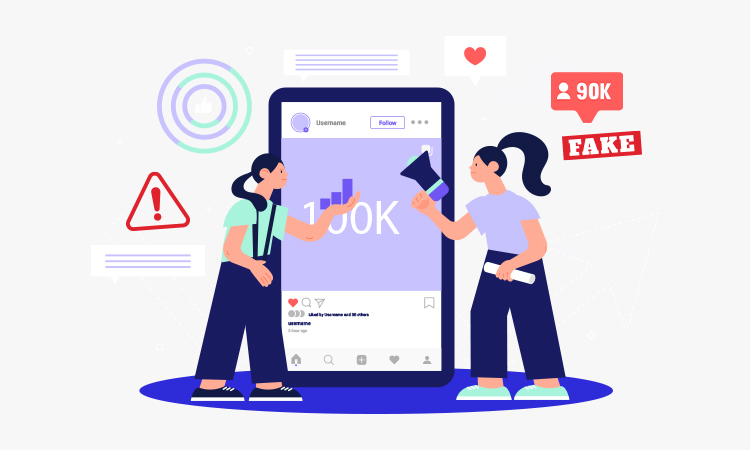
This is about using illegitimate techniques to get your Instagram account verified. No matter how urgently you need a verification, you shouldn’t use fake growth tactics to get verified, as it can lead to your application rejection.
You should never buy fake followers, as Instagram’s verification team is continuously working to identify fake engagement and inauthentic growth. You should focus on organic growth and build a legitimate Instagram following.
6 Common Reasons Why your Instagram Account Verification Request Can be Rejected
You cannot always expect your account verification application to get accepted by the platform. Your Instagram verification request can commonly be rejected due to notability criteria and strict adherence to authenticity.
In this section, we have enlisted 6 common reasons why your Instagram account verification application can be rejected. Identifying these reasons can help you prevent a verification rejection from happening – it’s as important as learning how to get verified on Instagram:
- Incomplete or Inauthentic Instagram Profile
If your Instagram account is private, your account will not get verified by the Instagram team. Your account must be public, have a complete bio, a profile picture, and at least one post. If your Instagram profile appears spammy, low-quality, and inactive, it may not represent a real and legal entity – the verification request has high chances of being rejected.
- Fake or Misleading Information
If you provide fake information during the verification process, your verification request is more likely to get rejected. For example, if you claim to be a celebrity when you are not, and you are using a fake ID, it can result in an immediate denial of your request. For other cases, it can even lead to the removal of your existing verification badge on Instagram or account suspension in difficult situations.
- Low Public Interest
If you are not widely recognized as a prominent public figure or a renowned brand, your account verification request can be rejected. Even if you have a solid following on Instagram, you may not meet the ‘notable’ criteria. This is a crucial reason why your account verification request can be rejected.
- Lack of Proven Notability
This is the most common reason for rejection of Instagram account verification requests. The Instagram team verifies only the ‘well-known’ and ‘highly searched’ individuals, businesses, and entities. If you lack substantial coverage in various credible news sources, your verification request is more likely to be denied. However, you should remember one thing that paid and promotional content does not count in this.
- Issues with Submitted Documents
Many individuals and businesses often provide blurry images of their IDs. Name mismatching also commonly happens between your government-issued ID and your Instagram profile. Additionally, if you submit invalid or fraudulent documents during the verification process, then there is also a chance of your Instagram account verification request being rejected.
- Lack of Clear and Inconsistent Account History
If your Instagram account has a history of changing niches, it is more likely that your request can get denied by the Instagram team. If you frequently change your Instagram username or profile name, or there are usually sudden shifts in content, Instagram may see it as a major risk and deny verification.
5 Common Mistakes to Avoid While Applying for Instagram Account Verification
While the process of getting the Instagram blue tick seems to be easy, certain mistakes can ruin your efforts to get the coveted blue badge. The following are 5 mistakes that many people commonly make while submitting an Instagram account verification request.
Along with learning how to get verified on Instagram, identifying and avoiding these mistakes is crucial to determining the chances of your verification request being accepted. It can help you avoid them and submit your request correctly, ensuring your request is granted by the Instagram team. Let’s have a look at the list:
Mistake 1: Buying Fake Reviews
Do you know that Instagram actively audits its accounts to detect malicious behavior? If you buy followers and engagement for your posts, Reels, or Stories, it significantly violates Instagram’s community guidelines. It can even result in your profile suspension, and the team can immediately deny your verification request.
Mistake 2: Ignoring Profile Optimizing
Your Instagram profile is your digital resume. Before you apply for the profile verification, you must ensure that your account has a profile picture, a complete bio, and an active posting history. Your profile picture and bio will reflect your individual and brand identity. Thus, if you are not optimizing your Instagram profile, your verification request can be denied by Instagram.
Mistake 3: Submitting Multiple Verification Requests Quickly
Have you submitted a new request while the previous one is still pending? If yes, this is a big mistake! Sending a verification request immediately after the rejection of your previous request will restore your place in line and can easily trigger a cool-down period. You must wait for at least 30 days after one rejection.
Mistake 4: Relying Only on Follower Count
Don’t rely just on followers to get verified on Instagram. Apart from your followers, you must prioritize your Instagram profile optimization and beyond. There is no minimum follower count that you need to have on your profile for requesting verification. While verifying your request, you need to focus on uniqueness, public interest, and authenticity. Try to establish a robust online presence as well as drive organic reach for your posts rather than just focusing on the number of followers you have.
Mistake 5: Submitting Inaccurate or Mismatched Identification
Many often submit inaccurate or fake identification documents to get their Instagram account verified. But this is a wrong practice. You need to ensure that your uploaded government-issued ID clearly matches your actual name and details in your Instagram ID. The documents you will upload must be accurate, real, and official, such as a passport and a driving license.
Conclusion
If your Instagram account is not verified, you may be missing out on a list of benefits as a creator, brand owner, or prominent public figure. Getting verified on Instagram in 2026 is not an online reputation management strategy just for celebrities. No matter whether you want to build an authentic and high-engagement Instagram profile or subscribe to the Meta Verified service to get your account verified, the ultimate goal is to build trust with your audience and protect your account from fraudulent social media activity, such as impersonation.
We hope that our comprehensive guide on how to get verified on Instagram will help you learn about the strategic process of ensuring your Instagram account is verified and protected from impersonation. From enhanced online visibility to better brand account support from Meta, you can leverage a list of benefits.
Still confused about how to get started by submitting the application for your Instagram verification? Consult with a renowned online reputation management agency to seek their assistance in securing the blue badge for your Instagram account!
FAQs
Below, we have answered some of the most frequently asked questions related to Instagram account verification:
Ans. There is no official minimum or maximum follower count that you need to get verified on Instagram. You can get the Instagram blue tick even with a few hundred followers or no followers at all. The success of your verification request completely depends on the verification path you choose. You need to have an accurate profile photo, a complete bio, and an active posting history.
Ans. If you’re wondering whether it’s important to get the verification badge or not, let us tell you that no matter whether you run a small business on Instagram or you are a celebrity or a prominent public figure, getting a blue tick can provide you with a list of benefits. It largely depends on your budget and growth assets. If you have a sufficient budget, you can explore the Meta subscription to get the verification badge for your business.
Ans. Yes, social media creators can get verified on Instagram. If you are a social media influencer and are wondering how to get verified on Instagram, let us tell you that Instagram offers two main ways to get the verification badge:
a. Subscribing to the monthly verification packages of Meta Verified
b. Applying for free through the traditional method, based on your authenticity, media presence, and notability.
Ans. The time the verification process takes depends on the method you have chosen. If you subscribe to the paid Meta Verification service, it may take up to 48 hours. On the other hand, the free process to get the verification badge can take up to 30 days.
Ans. Yes, you can change your Instagram username even after your profile gets verified, but only if you are subscribed to the Paid Meta Verification. However, the process is entirely governed by Meta’s new official guidelines – you can review them using the Meta Verified Support dashboard. You cannot change your Instagram username under the old guidelines. Additionally, if you were verified under the traditional and free guidelines, the platform generally does not permit you to change your username without losing your Instagram blue tick.

